 Sasha
Sasha Mike Chen
A LinkedIn job search is a process that uses your profile, job listings, company pages, people search, and professional network. Its goal is to uncover suitable opportunities and connect you with people involved in hiring.
Introduction: Why Clicking Easy Apply Usually Isn’t Enough
If you’ve been applying to jobs on LinkedIn for weeks and getting nothing back, you’re not alone. A common pattern is simple: find a role that seems "close enough," click Easy Apply, attach a resume, and move on. After dozens of applications, you may still hear nothing.
The issue usually isn’t effort. LinkedIn is more than a job board. It combines job search, recruiter discovery, and professional relationships. Easy Apply uses only one part of that system.
This guide gives you a repeatable framework to run LinkedIn like an operating system: Get Found, Find Jobs, Find People, Convert. You’ll get step-by-step instructions, search methods, message templates, and a tracking sheet so you can see what actually produces interviews.
How LinkedIn Actually Helps You Find a Job
Most job seekers only use LinkedIn as a place to submit applications. But LinkedIn works because it creates multiple paths to the same result (an interview). When you understand the channels, you stop treating "apply" as the only move.
Channel 1 — Recruiters Find Your Profile
Recruiters search LinkedIn like a database. Your visibility depends heavily on:
- Keywords in your headline, About, and titles
- Location (and whether you match where they’re hiring)
- Skills (especially skills repeated across job descriptions)
- Current role and seniority signals
In other words: if your profile isn’t written like a searchable summary of what you do, you can be a perfect fit and still not show up.
Channel 2 — You Find Open Jobs
The Jobs tab is the obvious channel—filters, alerts, and saved searches help you discover roles early and narrow to high-fit postings. It can also attract a large applicant pool, which is why focused filters and thoughtful channel selection matter.
Channel 3 — You Find the Right People
People search is where you find:
- Recruiters (to confirm fit and process)
- Hiring managers (to show direct relevance)
- Employees (to learn team reality and sometimes earn referrals)
- Alumni (a useful shared context for starting a conversation)
Channel 4 — Your Network Creates Access
A referral isn’t magic, but a relevant contact may:
- help you understand the team’s priorities
- clarify whether the role is still active
- introduce your background with useful context
Professional acquaintances, alumni, and second-degree connections can expand the number of teams and opportunities you hear about.
| Channel | Your action | Likely outcome |
|---|---|---|
| Recruiter Search | Optimize profile | Recruiter outreach |
| Jobs Search | Search + alerts | Direct application |
| People Search | Find relevant people | Information or referral |
| Network | Build relationships | Warm introduction |
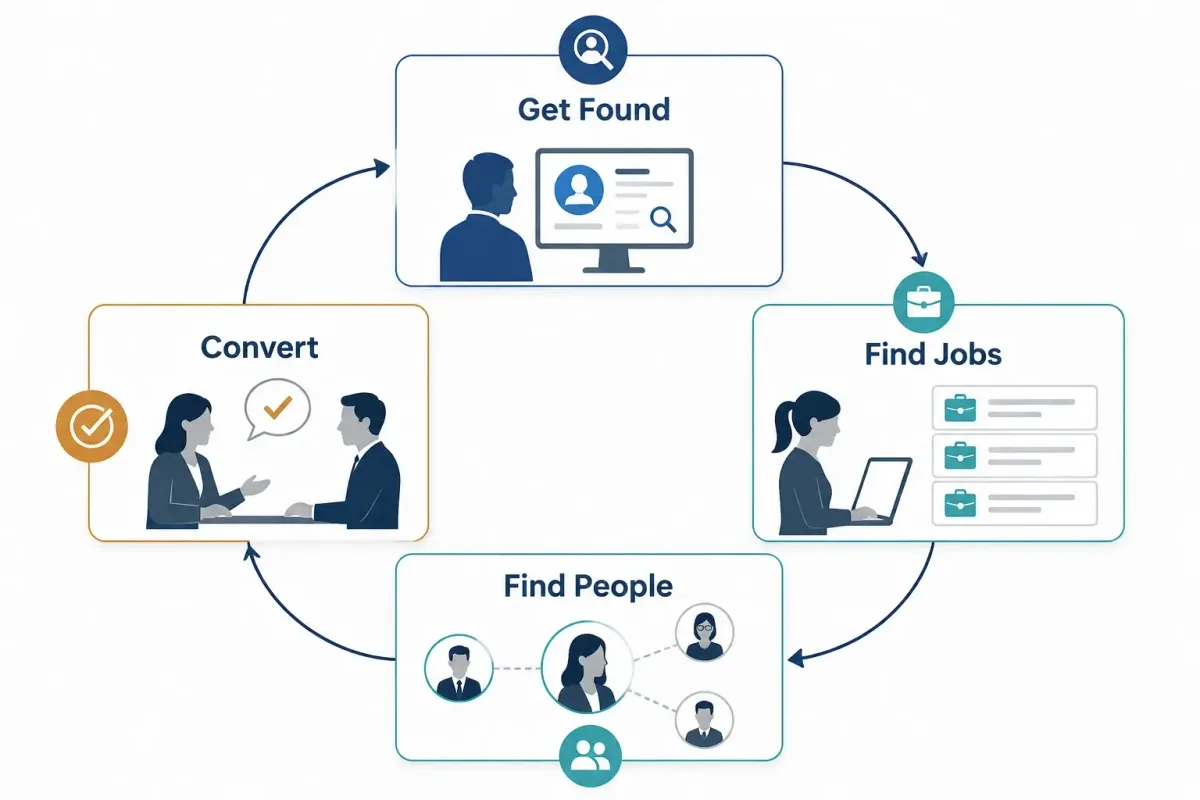
Key Takeaway: You don’t need to do everything on LinkedIn. You need to do the few actions that activate all four channels.
Step 1 — Define the Job You Want Before Searching
Before you touch LinkedIn search, decide what "a good job" means for you. If you don’t, LinkedIn will happily feed you a stream of random opportunities—and you’ll burn time applying to roles that were never a fit.

Choose One Primary Job Title
Pick one primary title you’re targeting right now. Don’t apply to five unrelated roles (e.g., Product Manager, Data Analyst, SDR, Project Manager, and UX Designer) and expect recruiters to understand you.
Done when: you can say your target title in one sentence without adding "or anything similar."
List Alternative Titles
Many companies use different labels for the same work. Build a small synonym list so you don’t miss roles.
Examples:
- Customer Success Manager
- Client Success Manager
- Customer Experience Manager
Done when: you have 3–8 alternative titles that truly describe the same type of job.
Define Location, Work Type, and Seniority
Decide your constraints up front:
- Work type: On-site / Hybrid / Remote
- Seniority: Entry level / Mid-senior / Contract
- Location and work authorization realities (especially for remote roles)
Done when: you can filter jobs to match your constraints in one minute.
Build a List of 20–30 Target Companies
Don’t rely only on whatever LinkedIn shows you today. Create a target list so you can search proactively.
Suggested groups:
- Dream companies (reach)
- Strong-fit companies (best probability)
- Backup companies (good enough; keep momentum)
Done when: you have 20–30 companies saved in a spreadsheet or note.
Target Job Worksheet (copy/paste)
- Primary target title:
- Alternative titles:
- Locations (top 3):
- Work type (on-site/hybrid/remote):
- Seniority level:
- Industries you want:
- Industries you avoid:
- 20–30 target companies:
Step 2 — Optimize Your LinkedIn Profile for Recruiter Search
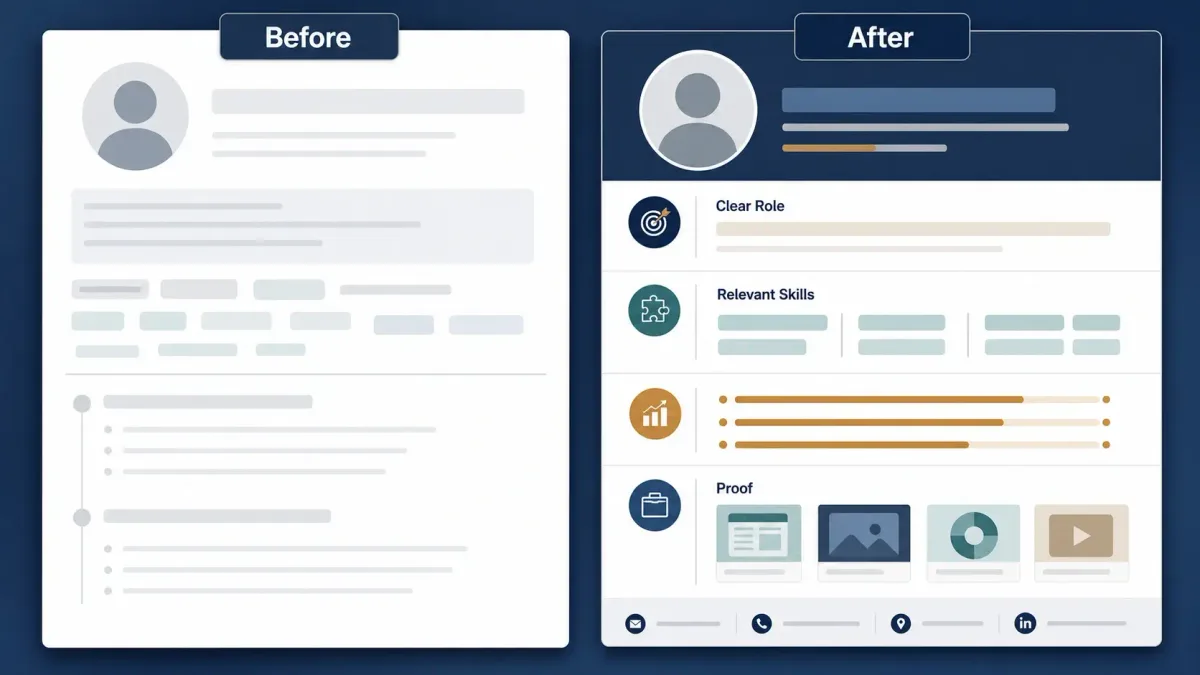
Your profile is not a biography. It’s a searchable landing page.
If recruiters can’t tell what you do in five seconds—or if your keywords don’t match what they’re searching—you’ll lose before you ever apply.
Use the Right Location
Location isn’t decoration. It’s one of the first filters recruiters use. If you’re targeting a specific metro area, set it.
If you’re open to relocation, make that clear in your profile (and in your messaging), but don’t rely on a recruiter to infer it.
Write a Searchable Headline
Use a headline formula that matches how recruiters search:
Target Role | Core Skill | Industry or Result
Example:
Customer Success Manager | SaaS Onboarding & Retention | B2B Technology
Before/after headline examples
- Before: "Open to new opportunities"
- After: "Data Analyst | SQL + Python | Dashboards & Experiment Analysis"
- Before: "Software Engineer"
- After: "Backend Engineer | Python + APIs | B2B SaaS Reliability"
Make the About Section Useful
A strong About section helps two things: search relevance and quick credibility.
Use a simple four-part structure:
- Current professional identity (what you do, in plain English)
- Main skills (what you’re strong at)
- Evidence/results (proof, not adjectives)
- Target opportunity (what you want next)
About template
I’m a [role] with [X years / X type of experience] focused on [core outcome].
My strengths include [skill 1], [skill 2], and [skill 3], especially in [industry/environment].
Recently, I [did action] which led to [measurable result]. I’ve also [second proof].
I’m currently exploring [target role] opportunities in [location/work type], ideally in [industry].
Rewrite Experience Around Results
Recruiters and hiring managers skim. Make each role scannable with a results-first structure.
Use this pattern:
Action + Task + Measurable Result
Examples:
- Built onboarding emails → reduced time-to-first-value by 18% over 60 days.
- Automated weekly reporting in SQL/Python → cut manual reporting time from 6 hours/week to 1 hour/week.
If you don’t have hard metrics, use "scope" metrics: volume, frequency, complexity, or responsibility. Keep the claims on your profile consistent with your application materials; this guide explains how to make a resume stand out to recruiters and ATS.
Add Relevant Skills
Don’t stack 50 random skills. Prioritize skills that appear repeatedly in the job posts you want.
A practical editorial heuristic: if a skill appears repeatedly across your target job descriptions, consider placing it near the top of your Skills section when it accurately reflects your experience.
Use the Featured Section
Featured is a credibility shortcut. Add 2–5 items that prove your work:
- Portfolio
- Case study
- Slide deck
- GitHub
- Writing sample
- Certification
Configure LinkedIn Open to Work
You have two common options:
- Recruiters only: offers more privacy than the public option, but it is not completely confidential. LinkedIn attempts to hide the signal from recruiters at your current company and related companies. It cannot guarantee privacy in every case.
- All LinkedIn members: provides broader visibility, including the public profile frame, but offers less privacy.
Choose based on your situation and risk tolerance. Review LinkedIn’s official Open to Work privacy explanation before enabling the feature.

Complete the Contact Information
Make it easy to contact you without friction:
- a calendar link (optional)
- portfolio/GitHub (if relevant)
Profile checklist
- Location matches your target
- Headline includes target role + 1–2 core skills
- About has proof (results/scope)
- Experience bullets show outcomes
- Skills reflect job descriptions you’re applying to
- Featured section shows proof
- Open to Work is set intentionally
- Contact info is complete
Step 3 — Create a Smarter LinkedIn Job Search
A smarter search isn’t "more searching." It’s better targeting, better filters, and multiple discovery routes.

Start With Regular Keyword Search
Use combinations of:
- title keywords
- skills
- industry terms
- target company names
Example: "customer success" AND "onboarding" AND "SaaS".
Use Natural-Language Job Search
LinkedIn offers an AI-powered job search experience that accepts natural-language descriptions of the role you want. Feature availability and limits can change, so check LinkedIn’s current AI-powered job search documentation before relying on it.
Example query:
Remote customer success jobs at B2B software companies that require Spanish
Use Boolean Search for LinkedIn Jobs
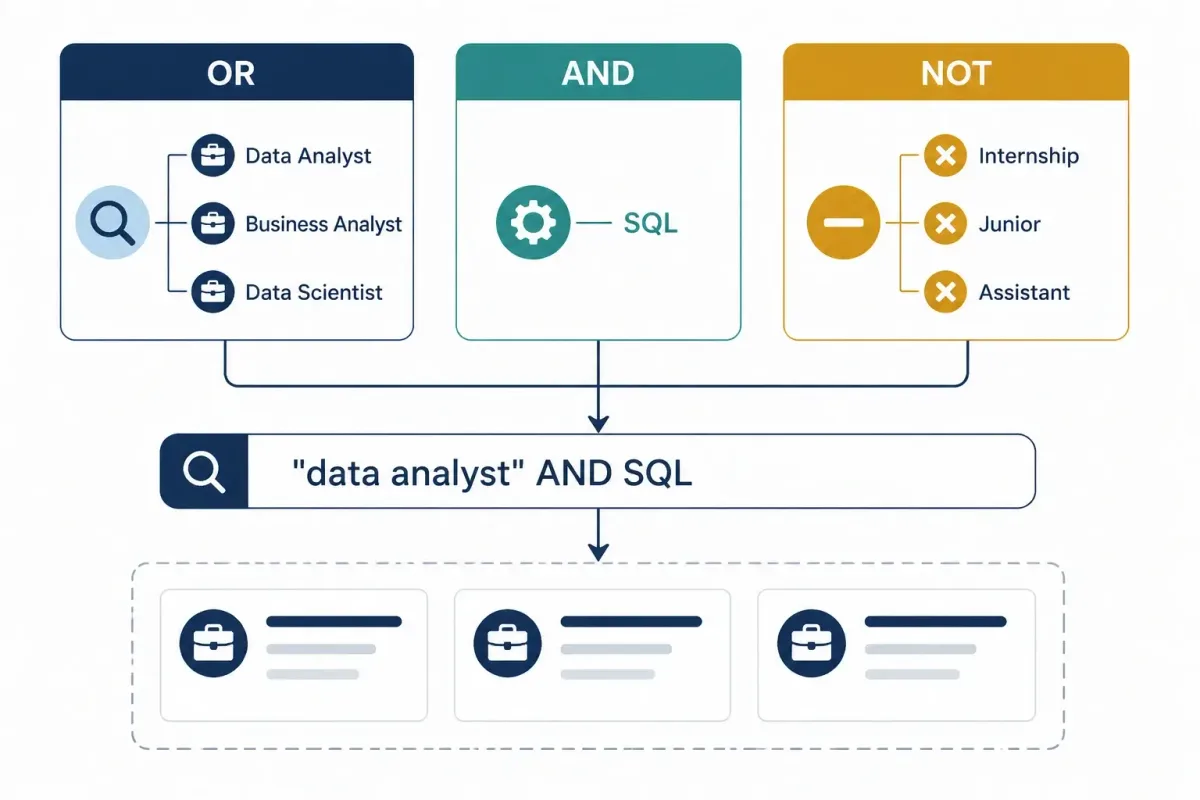
Boolean search uses operators such as AND, OR, and NOT to combine or exclude terms. LinkedIn requires uppercase operators and standard straight quotation marks for exact phrases; see its official Boolean search instructions.
Copy/paste templates you can adapt:
("customer success manager" OR "client success manager" OR "customer experience manager") AND (SaaS OR "B2B software")("data analyst" OR "analytics specialist") AND (SQL AND Python) NOT (intern OR internship)("product manager" OR "product owner") AND ("platform" OR "API") NOT ("senior director" OR VP)("software engineer" OR "backend engineer") AND (Python OR Golang) AND (AWS OR GCP)("marketing manager" OR "growth marketer") AND (lifecycle OR retention OR CRM) NOT ("paid media")
(If you haven’t used Boolean search LinkedIn jobs queries before, start by copying one template and swapping only the job title terms.)
Use Filters in the Right Order
Recommended order:
- Date posted
- Location
- Experience level
- Job type
- Remote
- Company
- Easy Apply
This order forces relevance first—then convenience.
Create Multiple Job Alerts
Don’t create one huge alert. Create several focused alerts, while staying within LinkedIn’s current alert limits. You can manage alerts from the Jobs section; see LinkedIn’s official job alert instructions.
Examples:
- Primary title + location
- Alternative title + location
- Remote title
- Target company roles
Search Company Pages Directly
Instead of searching the whole market every time:
- go to a company page
- open its Jobs tab
- scan all open roles
This is especially effective for your "Dream" and "Strong-fit" lists.
Search LinkedIn Posts
Posts can surface hiring announcements, team updates, and roles shared directly by recruiters or hiring managers.
Try keyword combinations like:
hiring + job title + citywe’re hiring + team namelooking for + job title
Step 4 — Decide Whether a Job Is Worth Applying To
Not every posting is worth your time. Use a quick scoring method so you invest energy in roles that can realistically convert.
A Practical Fit Heuristic
You do not need to match every bullet. As a prioritization heuristic—not a hiring standard—apply when you meet most core responsibilities and all non-negotiable requirements. These may include work authorization, location, licenses, or required experience.
Quick Job Score (fast checklist)
- Job posted recently; newer postings may be worth reviewing first
- Core requirements match
- Location + work authorization match
- Same job exists on the company website (or is verifiably real)
- You can identify the hiring team or recruiter
- No obvious risk flags (see below)
- You can tailor your resume without rewriting your entire life
Job Quality Checklist
- Posting date is recent enough to justify further review
- Clear responsibilities (not just buzzwords)
- Real company page + employees exist
- Company website has matching role OR posting is verifiable
- Reasonable requirements (not "entry level" + 7 years)
- Salary range or level is plausible for the role/location (when available)
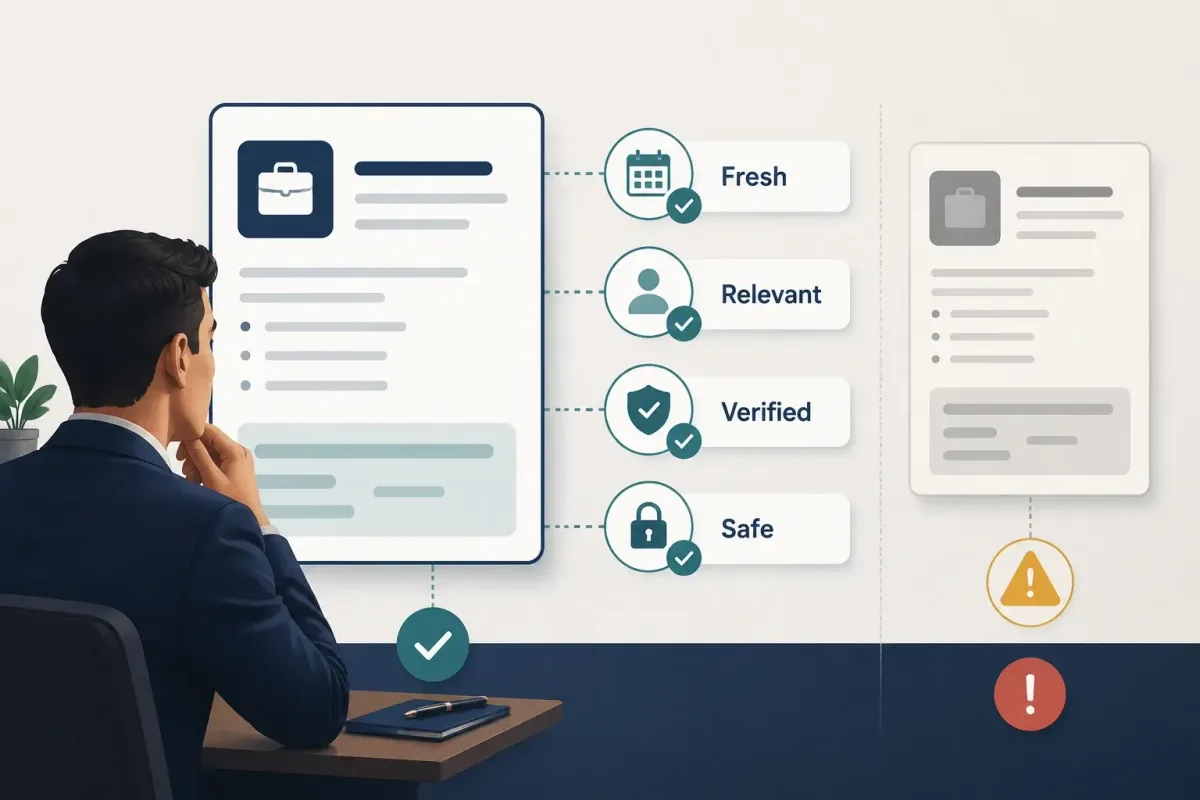
⚠️ Warning: If a posting looks duplicated, outdated, or vague, validate it before you spend time tailoring materials.
Step 5 — Choose the Best Application Channel
Applying isn’t one action. It’s a channel choice.
When to Use Easy Apply
Easy Apply can work when:
- the process is short
- the role is newly posted
- your match is high
- there isn’t a better official channel
- you can submit tailored materials quickly
When to Apply on the Company Website
The company website may be the better channel when:
- the role page is more complete
- you need to upload a tailored resume
- LinkedIn details are thin
- you want to use the employer’s official application flow
When to Look for a Referral
A referral is best when:
- you have a real relationship
- the person understands your work
- the job is competitive
- the company clearly values internal referrals
Avoid Applying Twice Without a Reason
Submitting the same application through multiple channels may create duplicate records or make your own tracking harder. Do not do it automatically.
If you already applied through Easy Apply, review the employer’s instructions before applying again on the company site. LinkedIn notes that Easy Apply submissions generally cannot be edited or withdrawn after submission; review its Easy Apply guidance before sending your application.
| Channel | Best for | Main drawback |
|---|---|---|
| Easy Apply | Speed + early submission | Often highest competition; can feel low-signal |
| Company website | Full ATS submission + tailored materials | Takes longer |
| Referral | Warm access + faster review | Requires relationship; not always available |

Step 6 — Find the Right Recruiter or Hiring Manager
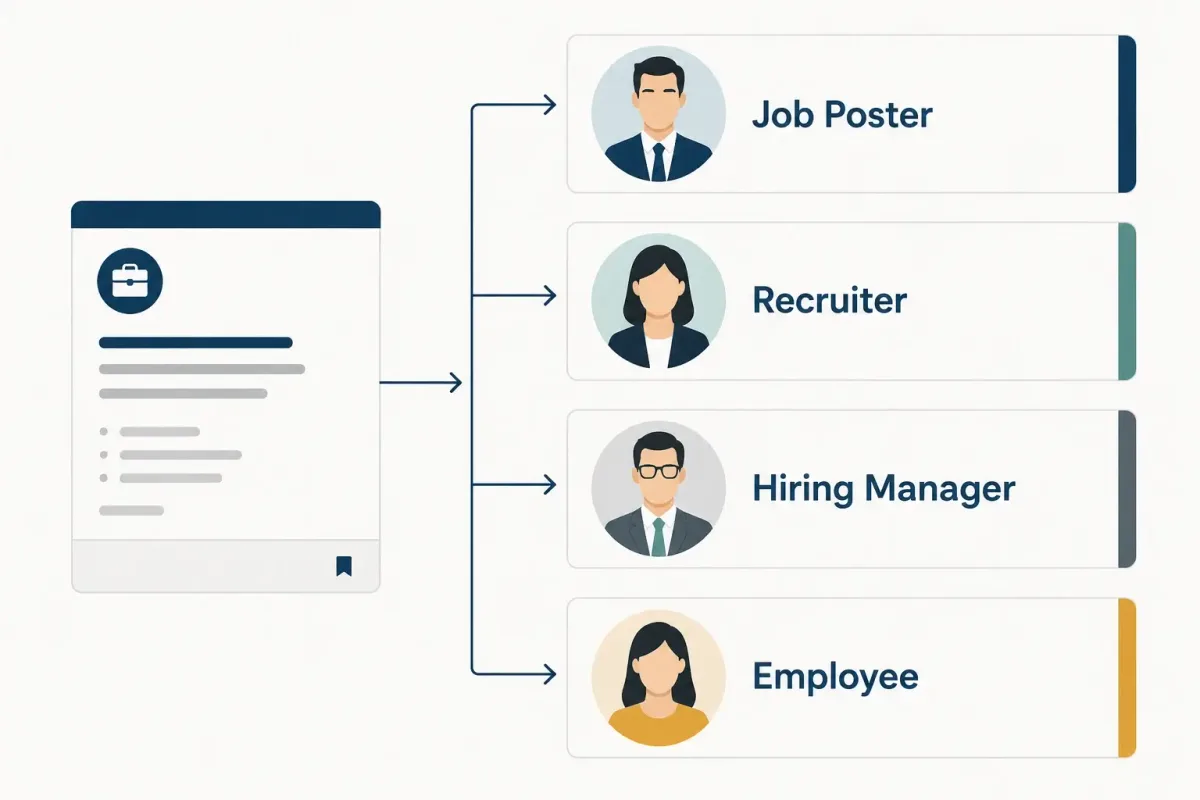
If you want more interviews, stop messaging random people. Message the most relevant person—one or two per job.
Start With the Job Poster
If the job listing shows a poster, start there. That’s the fastest path to the right inbox.
Done when: you’ve found a specific person tied to the posting.
Search for the Relevant Recruiter
Use search formulas like:
- Company name + Recruiter + Department
- Company name + Talent Acquisition + Location
Example: "Acme" + "Talent Acquisition" + "Austin".
Identify the Likely Hiring Manager
Try:
- Company name + Head of Customer Success
- Company name + Engineering Manager + Team
Then sanity-check:
- does their team plausibly own this role?
- do their direct reports look like the people in the job posting?
Look for Employees and Alumni
Prioritize people who are most likely to respond:
- same school
- former coworkers
- same industry n- same team
- shared connections
Do Not Message Everyone
Rules that keep you from burning bridges:
- 1–2 relevant people per job, max
- no mass blasting
- no repeated nudges
- don’t ask for a referral in the first message
Who should I contact? (simple flow)
- Is there a job poster listed? → Message them.
- If not, can you find a recruiter for that function/location? → Message recruiter.
- If not, can you identify the hiring manager? → Message hiring manager.
- If not, find one employee/alumni for information—not a referral.
Step 7 — Send Messages People Can Actually Answer
Most LinkedIn messages fail because they ask for something vague ("Can you help?") or heavy ("Can you refer me?") from a stranger.
Your goal is to make it easy to say yes.
Connection Request Template
Hi [Name], I’m exploring [role] opportunities in [industry] and found your work at [company] relevant. I’d be glad to connect.
Recruiter Message After Applying
Hi [Name], I applied for the [job title] role today. My background in [relevant skill] and [specific result] appears closely aligned with the position. I wanted to introduce myself and share my interest in the team.
Hiring Manager Message
Keep it simple. Don’t ask them to "check your application." Show relevance.
Template:
Hi [Name] — I’m applying for the [job title] role on your team. I’ve done [similar work] and recently achieved [specific result]. If helpful, I can share a 3-bullet summary of how I’d approach [problem the role likely owns].
Alumni or Employee Information Request
Ask for context, not favors.
Template:
Hi [Name], I’m considering the [job title] role at [company]. Would you be open to sharing how the team is structured and what tends to matter most in interviews? A few quick pointers would help a lot.
Referral Request
Only use this when you’ve built at least a small relationship (or they’ve signaled willingness).
Template:
Hi [Name] — thanks again for the context. If you feel comfortable, would you be open to referring me for the [job title] role? I can send a tailored resume and a short bullet summary of why I’m a fit.
Follow-Up Template
One follow-up is enough.
Hi [Name] — quick follow-up in case this got buried. No worries if you’re not the right person, but I’d appreciate any direction on who owns hiring for the [job title] role.
| Contact | Purpose | Don’t do this |
|---|---|---|
| Recruiter | Confirm fit/process | Send a long cover letter |
| Hiring manager | Show specific match | Demand an interview |
| Employee | Learn team reality | Ask for referral immediately |
| Alumni | Build shared context | Mass-send a generic template |
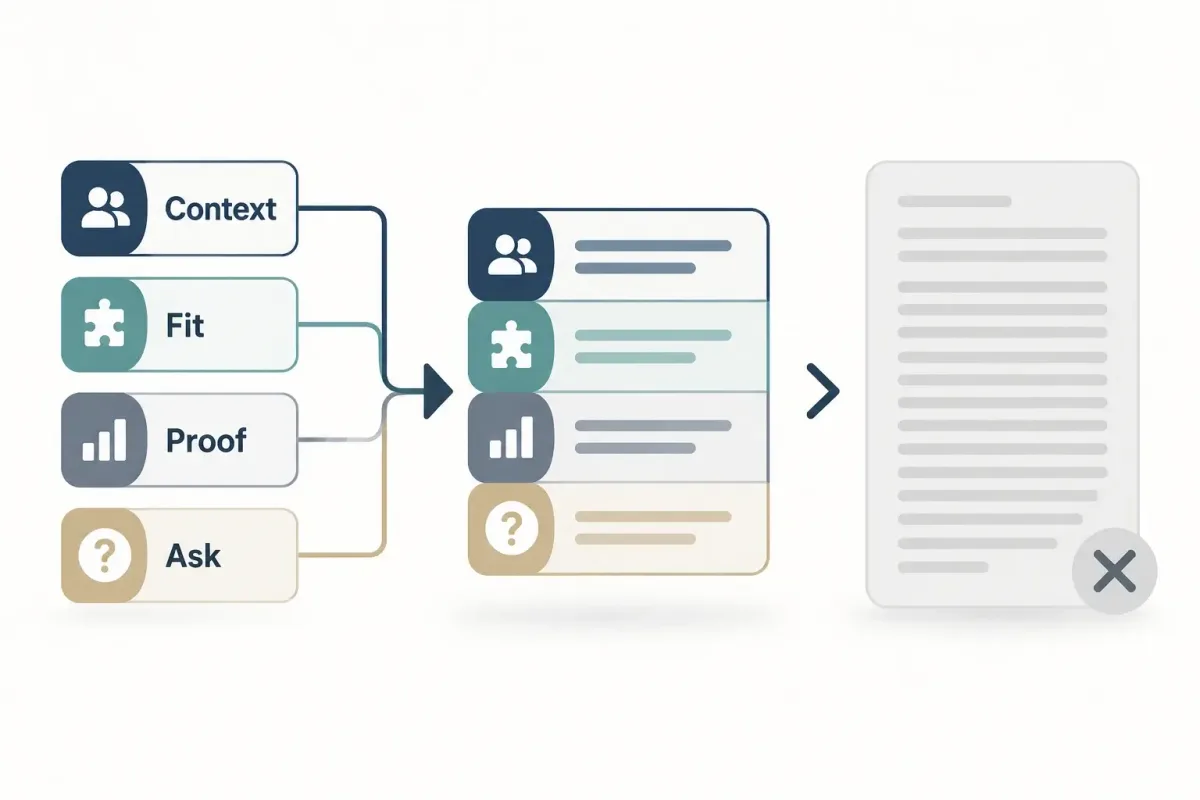
Pro Tip: If you’re going to message someone, spend 60 seconds finding one real detail (a post, team, project, or specialty). That single detail is what makes your message feel human.
Step 8 — Network Without Becoming a Content Creator
A lot of job-search advice quietly turns into: "post all the time." For most job seekers, that’s not necessary.
You Do Not Need to Post Every Day
Posting can help visibility, but it’s not the requirement. A system that works even when you’re not posting daily is a better system.
Use Low-Effort, High-Relevance Engagement
A weekly routine that’s realistic:
- comment on posts from your target companies/teams
- congratulate a connection on a promotion
- share one short, professional insight (when you have one)
- respond to an industry question
- follow recruiters when they post new roles
Focus on Relevant Connections
500 random connections aren’t automatically better than 50 relevant ones. Build a network that overlaps with the jobs you want.
Build Relationships Before You Need Them
Don’t only show up when you want a referral. If you engage lightly over time, your future messages won’t feel out of nowhere.
Step 9 — Track Your LinkedIn Job Search Funnel
If you don’t track your funnel, you can’t diagnose your problem.
Use a simple table and update it daily.
LinkedIn also provides a built-in job tracker for saved and applied roles. You can use it alone or alongside your own spreadsheet; see LinkedIn’s official job tracker instructions.
Suggested tracking sheet fields
- Date
- Company
- Job title
- Job URL
- Application channel
- Resume version
- Contact person
- Message sent
- Response
- Interview stage
- Follow-up date
Job Search Tracking Sheet (copy/paste)
| Date | Company | Job title | Job URL | Channel | Resume v. | Contact | Msg sent | Response | Stage | Follow-up |
|---|---|---|---|---|---|---|---|---|---|---|
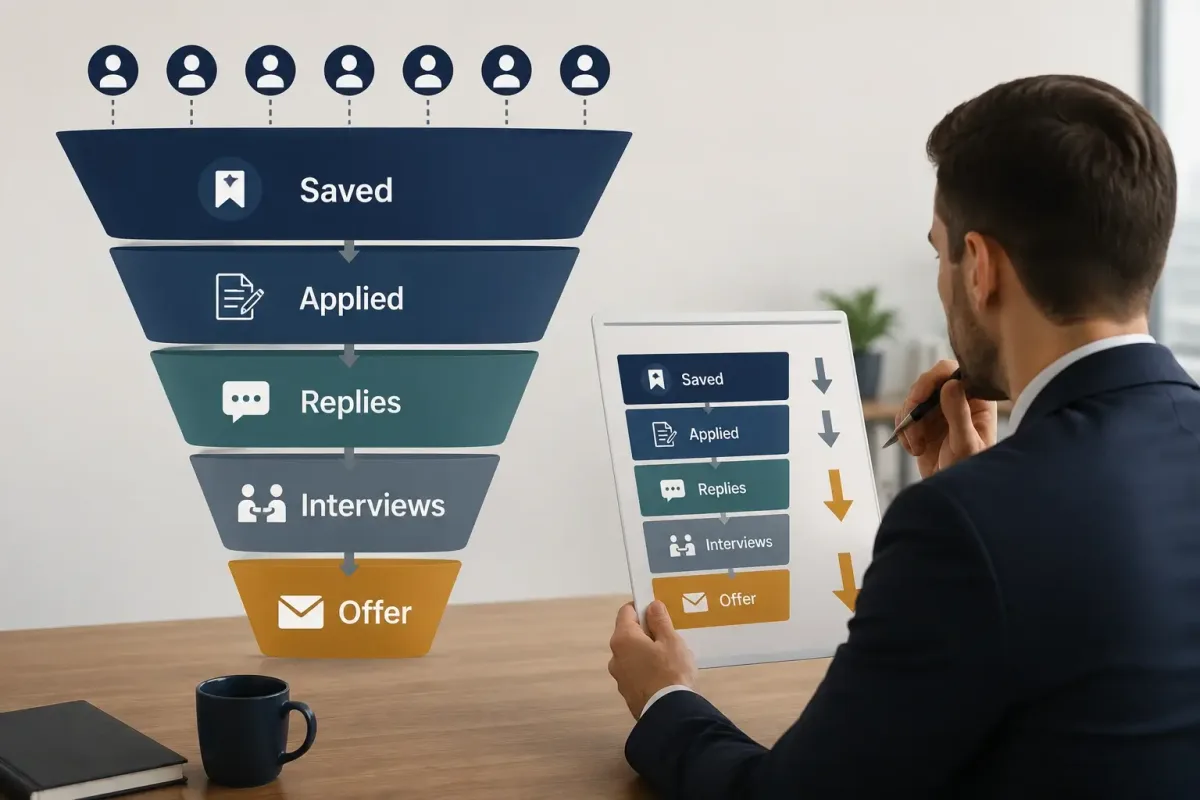
Diagnose the Problem From the Numbers
- You search a lot but don’t find roles: keywords or constraints are too narrow.
- You apply a lot but get no replies: fit, resume, or channel selection problem.
- Recruiters reply but no interviews: positioning or communication clarity problem.
- You get interviews but no offers: your issue may no longer be LinkedIn.
Measure Quality, Not Only Volume
Track:
- high-fit applications
- response rate
- recruiter conversations
- interviews per application
A 30-Minute Daily LinkedIn Job Search Routine
Consistency beats intensity. Here’s a routine you can actually maintain.
First 10 Minutes
- check job alerts
- save high-fit roles
- scan target companies for new postings
Next 10 Minutes
- submit 1–2 high-quality applications
- tailor resume to the posting (skills + top bullets)
Final 10 Minutes
- message one relevant person
- reply to messages
- update your tracking sheet
- leave one meaningful comment on an industry post
Weekly tasks (15–30 minutes):
- check profile views
- adjust keywords and headline
- review your funnel metrics
- refresh your target company list

Common LinkedIn Job Search Mistakes
These mistakes are common because they feel productive—but they don’t convert.
- Headline only says "Looking for opportunities."
- Targeting too many unrelated roles at once.
- Using only Easy Apply.
- Not checking the company website.
- Applying to clearly low-fit roles.
- Messaging lots of recruiters with the same copy.
- Asking for referrals immediately.
- Ignoring location.
- Not setting multiple job alerts.
- Not tracking applications.
- Posting lots of content unrelated to your professional direction.
- Treating LinkedIn Premium as the solution to everything.
LinkedIn Strategies for Different Job Seekers
Recent Graduates
Lean on what you do have:
- projects (with links in Featured)
- internships
- relevant coursework
- alumni outreach
If your formal experience is limited, use the projects, internships, and transferable skills in this guide to getting a job with no experience as evidence.
Career Changers
Translate your experience into the new role:
- list transferable skills in headline/About
- use target-industry keywords
- show one concrete proof project (even small)
Remote Job Seekers
Be extra clear about constraints:
- location/time zone
- work authorization
- remote filters
International Candidates
Be transparent. Don’t hide constraints like visa needs.
Prioritize roles that explicitly mention relocation or sponsorship.
Currently Employed Candidates
Be intentional about privacy:
- prefer "Recruiters only" Open to Work
- be cautious with public activity changes if your employer is sensitive
Sources and Methodology
This guide was reviewed on July 16, 2026 against current LinkedIn documentation. Product features, interface labels, limits, and availability may change. The prioritization rules in this article—such as how many roles to apply to or how recent a posting should be—are practical editorial heuristics, not universal hiring standards.
Primary references:
- Search for jobs on LinkedIn
- AI-powered job search on LinkedIn
- Boolean search on LinkedIn
- Let recruiters know you’re Open to Work
- Job alerts on LinkedIn
- Easy Apply guidance
- Job tracker on LinkedIn
- Job-search safety guidance
Conclusion: Use LinkedIn as a System, Not an Application Button
If you want more interviews from LinkedIn in 2026, stop treating it like a single "apply" button.
Do these four things consistently:
- Make your profile searchable so recruiters can find you.
- Search beyond the Jobs tab using companies, people, and posts.
- Build relevant relationships (one high-quality conversation beats 20 generic DMs).
- Track what produces interviews so you can adjust weekly.
Start today: choose one target job title, update your headline, create three job alerts, and identify ten target companies. When those efforts begin producing conversations, use this job interview preparation checklist to turn opportunities into stronger interviews.
Editorial note: Community discussions were used to identify recurring questions and frustrations, but community anecdotes are not treated as verified platform rules or universal outcomes.